How to Apply for Karnataka Welfare Schemes via Seva Sindhu

The Seva Sindhu Portal is an excellent online platform launched by the Government of Karnataka to simplify access to various welfare schemes for residents. Whether it’s for financial aid, subsidies on electricity bills, or unemployment support, Seva Sindhu enables citizens to apply for a range of services at their convenience. If you are a Karnataka resident looking to apply for welfare schemes, this guide will walk you through the steps involved in applying via the Seva Sindhu Portal.
Get set up on the portal

1

Make sure you’re a resident of Karnataka and have your Aadhaar and mobile number ready (linked to Aadhaar if required).

2

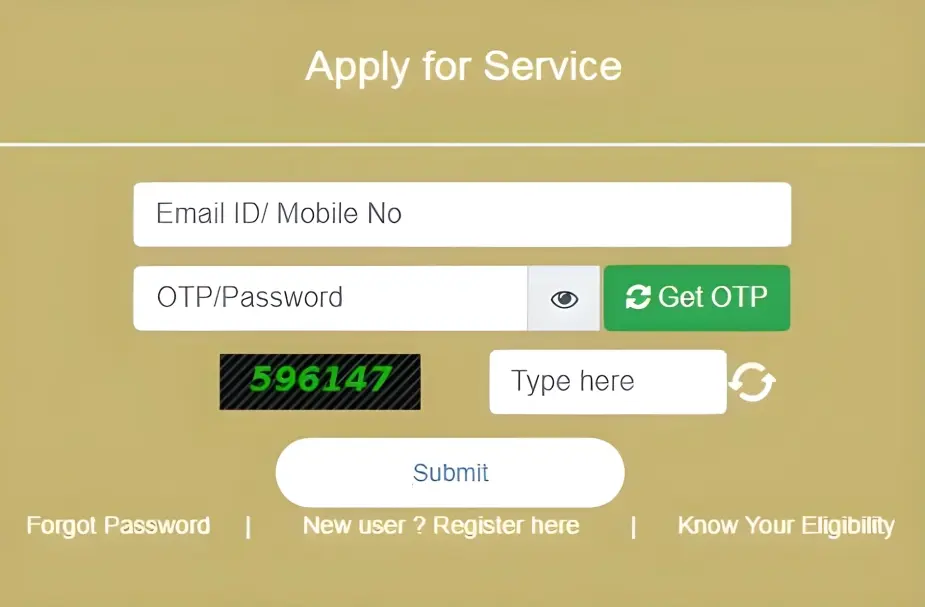
Go to the Seva Sindhu Portal and register if you haven’t already: enter your Aadhaar, mobile number, email, create a password.

3

If you already have an account, just log in using your mobile number/email and OTP.

Browse and select the welfare scheme

  • Once logged in, find the section “View All Available Services” (or similar) where you can see different welfare schemes and services offered.
  • Pick the welfare scheme you’re eligible for (for example, free electricity support, unemployment allowance, etc.). For example, the Gruha Jyothi Scheme is one such scheme that you can apply using the portal.

Check eligibility & gather documents

  • Every scheme will have its own eligibility criteria: residence, electricity consumption, unemployment status, etc. For example, Gruha Jyothi requires the applicant to have average residential consumption below a set number of units.
  • Collect the required documents: Aadhaar card, electricity bill/connection ID (if the scheme is power subsidy), income certificate, etc.

Fill and submit the application

1

On the scheme’s page, fill in the required details: your name, address, consumer/account ID (if relevant), Aadhaar number, mobile number, etc.

2

Upload clear scanned copies or photos of the required documents.

3

Confirm the declaration/consent box, enter captcha if required, and submit your application.

Track your application status

  • After submission, you’ll receive an acknowledgment number or SMS.
  • Go to the “Track Your Application Status” section on the portal, enter your reference, select the scheme/escom (if applicable) and check how it is processing. For example, you can track Gruha Jyothi status by consumer/account ID. You can also read :  How to Apply for Multiple Services on Seva Sindhu Portal

Follow up if needed

  • If you receive a rejection or need to update something, gather correct info, update (if the portal allows) or reapply with correct details.
  • For any doubts or help, contact the Seva Sindhu helpdesk (check the portal for contact numbers).

Tips to increase acceptance chances

1

Before submitting, double-check every field: name, date of birth, address, Aadhar number, mobile number.

2

Make sure the documents are scanned or photographed clearly, no blur, no cut-off parts.

3

Use a supported browser and upload file sizes/formats as specified. Sometimes portal glitches cause rejection.

4

If you’re uncertain, visit a service center (for example in Karnataka, there are citizen service centres) and ask them to help you check.

5

Keep a copy of your submission receipt/acknowledgement in case you need to follow up.

What if you’ve applied multiple times and still get rejected?

If despite following the steps you still get rejected:

  • Pause and review eligibility criteria for the specific service you applied to. Maybe you aren’t eligible (residency, date, income level etc).
  • Ask someone (teacher, friend, or local help centre) to review your documents with fresh eyes.
  • Consider applying offline if the portal access is problematic.
  • Keep track of your application history—if you’ve made many re-applications with similar errors, you might need to escalate.

FAQs

Generally no—once an application is submitted and rejected you usually don’t get the fee back. So it’s best to make sure everything’s correct before submitting

The portal’s “Track Application Status” page often shows remarks. If not, you may need to contact support

Some services allow you to edit and resubmit; others require a fresh application. Check on the portal

No. It only means this attempt failed because of some reason. You can correct and try again, unless explicitly stated otherwise

Once you’ve corrected the issues, you can re-apply as soon as you’re ready. There’s no need to wait, unless stated in the instructions.

Final Thoughts

Getting your Seva Sindhu application rejected can feel like a setback, but it’s really just a signal: “Fix this part, and try again.” With correct documents, accurate details, a clear submission and maybe a little help, you can increase your chances of success next time. Treat this as a learning step, check everything carefully, and re-apply confidently. Good luck!
Similar Posts

Leave a Reply

Your email address will not be published. Required fields are marked *