Seva Sindhu application Status Check 2026: Track App easily
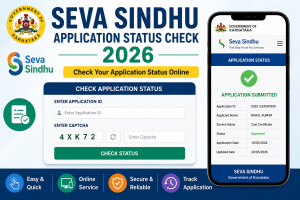
If you have applied for government services through the Seva Sindhu portal, it’s easy to track the seva sindhu application status of your application. The Seva Sindhu platform provides two straightforward methods for checking your application status — one with a login and another without needing to log in. Here’s a comprehensive guide to help you track your application.
Method 1: Track Application Status by Logging into the Seva Sindhu Portal
This method is available for users who submitted their applications using their Seva Sindhu account. You can check the status of applications filed within the last 3 months. Follow these steps:
Steps to Check Seva sindhu application Status:
- Visit the Seva Sindhu Portal: Go to the official website at Seva Sindhu Services Portal.
- Log in to Your Account: Enter your mobile number or email ID and password (or use an OTP) to log in. Complete the CAPTCHA and click Submit to access the portal.
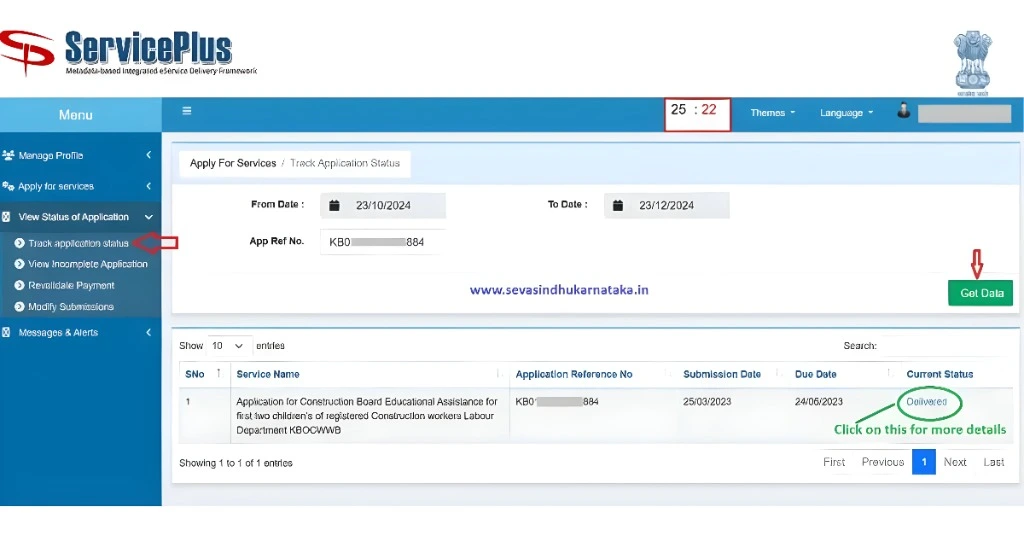
- Navigate to Application Status: Once logged in, go to the dashboard and select the ‘View Status of Application’ menu. Click on ‘Track Application Status’.
- Enter Application Details: Fill in your application reference number, which can be found on your acknowledgment receipt. Select the automatic date range (from and to) for the last 3 months.
- Submit and View Status: Click ‘Get Data’ to fetch the status of your application. You’ll see whether it is still in progress, approved, rejected, or requires further action.
By following these steps, you can easily track your application status for those submitted in the past 3 months.
Method 2: Track Application Status Without Logging in
If you have applied at a CSC center or via a cyber café or if you prefer not to log in, you can still track the Seva Sindhu application status of your Seva Sindhu application. This method works for all applications, irrespective of the submission date, and doesn't require logging into the portal.
Steps to Check Status:
- Access the Seva Sindhu Portal: Visit the Seva Sindhu website and click on ‘Track Application Status’.
- Choose Tracking Option: You’ll be presented with two options:
- Track Through OTP/Application Details
- Track Through Application Reference Number
For simplicity, choose ‘Through Application Reference Number’.
- Enter Application Details: Input your application reference number, which is found on your acknowledgment receipt.
- Choose Date Type: Select ‘Application Submission Date’ as the tracking option. This date is listed as "Application Date" on your acknowledgment receipt.
- Complete the CAPTCHA: Verify that you're not a robot and click Submit.
- View Application Status: After submitting the details, the portal will display the status of your application, including whether it is In Progress, Completed, or Delivered.
This simple process lets you track your application status without having to log in.
Why Your Seva Sindhu Application Status May Not Update
After submitting your application, the status may not change immediately. In most cases, the concerned department first verifies your personal details and supporting documents before updating the application. Depending on the service you applied for, this process can take a few days or even several weeks. If your status remains unchanged for a long time, verify that you entered the correct application reference number and check the portal again after some time. If the issue continues, contact the Seva Sindhu support team or the department handling your application for further assistance.
Common Seva Sindhu Application Status Messages Explained
When you perform a Seva Sindhu application status check, you may come across different status messages. Understanding what each status means can help you know the current stage of your application and whether any action is required from your side.
Submitted
Your application has been successfully received by the Seva Sindhu portal. It is waiting to be reviewed by the concerned department.
Under Verification
The authorities are checking the information and documents you submitted. During this stage, officials may verify your identity, eligibility, and uploaded documents.
In Progress
Your application is actively being processed. No further action is usually required unless the department contacts you for additional information.
Approved
Your application has met all the eligibility requirements and has been approved. The requested service, certificate, or benefit will be issued shortly.
Rejected
Your application was not approved due to missing documents, incorrect information, or eligibility issues. Check the rejection reason on the portal before submitting a fresh application.
Completed
The department has successfully processed your application, and the requested service has been completed.
Delivered
Your certificate, approval letter, or requested government service has been generated and delivered through the selected mode.
Documents and Details Required to Check Seva Sindhu Application Status
To complete your Seva Sindhu application status check 2026 without any interruption, keep the following information ready before visiting the portal:
- Application Reference Number
- Acknowledgment Receipt
- Registered Mobile Number (for OTP login)
- Application Submission Date (if required)
- Stable internet connection
- Access to the official Seva Sindhu portal
Having these details available ensures a quick and hassle-free tracking experience.
Unable to Check Your Seva Sindhu Application Status? Here's How to Fix It
If the application status is not displaying correctly, don't worry. The issue is often temporary and can usually be resolved with a few simple steps.
- Make sure you entered the correct application reference number.
- Verify the application submission date if the portal asks for it.
- Refresh the page and try again after a few minutes.
- Clear your browser's cache and cookies.
- Use an updated browser such as Google Chrome, Microsoft Edge, or Firefox.
- Avoid checking the status during scheduled portal maintenance.
- Contact the Seva Sindhu Helpdesk if the problem continues for several days.
These troubleshooting steps resolve most tracking-related issues without requiring a new application.
How Long Does Seva Sindhu Take to Process an Application?
The processing time varies depending on the government service you have applied for. Simple services may be completed within a few working days, while applications requiring detailed verification or approval from multiple departments can take several weeks.
Factors that may affect processing time include:
- Document verification
- Department workload
- Eligibility verification
- Correction requests
- Public holidays and government office schedules
You can regularly perform a Seva Sindhu application status check to stay informed about the latest progress.
Tips to Get Your Seva Sindhu Application Approved Faster
Following a few best practices can help prevent delays and improve the chances of smooth application processing.
- Submit accurate personal information.
- Upload clear and valid supporting documents.
- Double-check all details before submitting the application.
- Use the same mobile number linked to your application.
- Keep your acknowledgment receipt safe until the process is completed.
- Respond quickly if the department requests additional documents or clarification.
A complete and error-free application is more likely to be processed without unnecessary delays.
Conclusion
Checking your Seva Sindhu application status 2026 is a simple way to stay updated on the progress of your government service request. Whether you choose to track your application by logging into the portal or by using your application reference number, the process only takes a few minutes. Keep your acknowledgment receipt safe, monitor your application regularly, and respond promptly to any requests from the concerned department to ensure a smooth and successful application process.
FAQs
Can I check my Seva Sindhu application status without logging in?
Yes, you can check the status of your application without logging into your account by following the second method.
Where can I find my application reference number and submission date?
Both details are available on the acknowledgment receipt generated when you submitted your application on the Seva Sindhu portal.
Can I check my application if I applied through a CSC or Cyber Café?
Yes, you can still track your Seva sindhu application status by using the second method, regardless of whether you applied online or through a CSC/cyber café.
How do I get my OTP for logging into Seva Sindhu?
The OTP is sent to the mobile number or email ID you provided when registering on the portal. You can request a new OTP if needed.
Is there any time limit for checking the application status?
If you are using the login method, you can only check the status for applications submitted in the last 3 months. The second method has no such restriction.
What if I cannot find my acknowledgment receipt?
If you have lost your acknowledgment receipt, try contacting the Seva Sindhu helpdesk or revisit the CSC or cyber café where you submitted your application to retrieve it.
Can I track the status of multiple applications at once?
Currently, you can track the status of one application at a time using either of the two methods outlined above.
How often is the application status updated?
The status is typically updated regularly, but the frequency may depend on the type of service you applied for.
What does it mean if my application status is "In Progress"?
"In Progress" means that the authorities are still processing your application. No further action is required from you at this stage.
How can I appeal if my application is rejected?
If your application is rejected, the portal should provide reasons for the rejection. You can then take corrective action and reapply or contact the relevant department for clarification.
Final Thoughts
Tracking your Seva Sindhu application status is a straightforward process, whether you prefer to log in or not. By following the easy steps outlined above, you can stay updated on the status of your application, ensuring that you are aware of any actions required. Always keep your acknowledgment receipt safe, as it contains the essential details needed to track your application.